Stripped the best feature out of antigravity and made it open source
June 3, 2026

The problem
LLMs are good at reading source code. they are completely blind to what that source code produces in a live browser.
when you ask the model why the UI is not behaving the way you wanted or if you upload a image and ask it to change the way you want it, the model doesn’t know what the computed z-index actually is or which ancestor element created a new stacking context or what is trapping it there, they just look at the code and try to guess from trained data.
it guesses. sometimes it guesses right. often it doesn’t.
So i thought about providing the computed values with along with the pixels, we are collecting the information needed to answer these questions which exists in the browser. chrome knows the exact computed values of every css property on every element. Chrome DevTools Protocol (CDP) exposes box models, computed styles, accessibility trees, paint metrics, etc..
this was my intuition to extract the UI debugging feature embedded in google’s antigravity, so i just wanted to use it indefinitely without paying.
What Gravity is
Gravity is an MCP server. you add it to your IDE config like any other tool:
{
  "mcpServers": {
    "gravity": { "command": "gravity" }
  }
}
then you load a small Chrome extension, click “Connect to Tab”, and your LLM now has 11 tools it can call against your live browser tab. The actual live tab CSS, viewport, computed values queried through chrome’s debugger API in real time.
for example if you ask “why doesn’t z-index: 9999 work on this element” gravity tools will help you to:
- resolves the selector to a DOM node -> gets the computed styles -> walks up every ancestor, checking each one for the 8 CSS properties that create stacking contexts —
transform,opacity < 1,filter,isolation: isolate,will-change,mix-blend-mode,contain, and positioned elements with z-index - Returns exactly which parent is the problem, with the actual property value
{
  "ancestorsWithStackingContext": [
    {
      "tag": "div",
      "reasons": ["transform: matrix(1, 0, 0, 1, 0, 0)"]
    }
  ],
  "explanation": "This element is nested inside 1 stacking context. Even z-index: 9999 cannot escape it."
}
there you go. :D
Two versions that didn’t work
Getting here took two failed attempts. both failures were interesting.
V1 had five parts: MCP server → native host process → Chrome native messaging → extension → tab. the mcp server was a websocket client. the native host was the ws server on port 9224. the mcp server connected out to it, sent CDP commands through, got responses back. native messaging is what launched the native host — but that requires registering a manifest in the OS registry with an absolute path to a .bat file, and the .bat had to point to the right node binary. chrome silently refuses to launch the host if one path is wrong anywhere in that chain. no log, no error, just silence.
It was Windows-only.
V2 fixed the flaw thiss time: V1’s host always started a ws server on port 9224, so when chrome spawned a second instance (one per extension session or profile reload) it would crash with EADDRINUSE. if the port if free V2’s host probes the port first, it becomes the server; if taken, it connects as a client to the existing server and relays through it. second instance becomes a relay instead of a crash. V2 also added a CLI: gravity setup-native-host <extension-id> to write the manifest and registry key, gravity doctor to verify. the mcp server lost native-bridge.ts as a separate module; all the WebSocket client logic was inlined into mcp-server.ts. what V2 didn’t touch was the connection direction (mcp server still a client chasing the host), the SW lifetime problem, reconnect spam. the relay fix was real, everything else failed in the same ways.
both versions had the same root problem: 3 parts of the process needs to be kept alive at the same time, all of them are ephemeral by default, the mcp server was a websocket client. it had to connect to the native host, which is launched by chrome, which only happened when the user clicked “Connect to Tab”. untill then, the mcp server spammed reconnect attempts every 2 sec. The IDE log was just a dumping-ground and nothing worked.
The fix
turned the table around in v3.
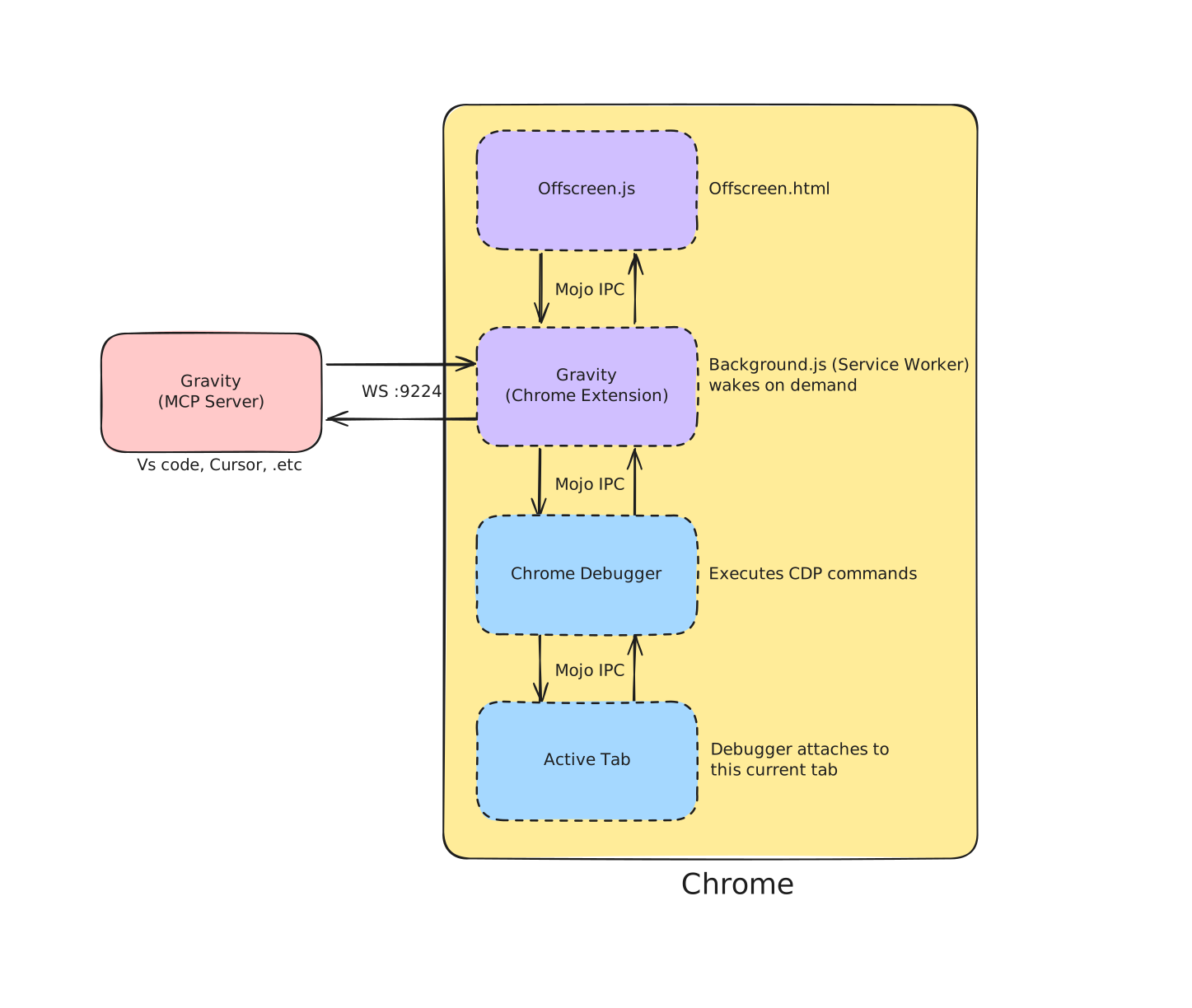
The MCP server is now the WebSocket server. The extension connects out to it.
The mcp server starts, binds port 9224, and waits. It has no idea when the extension will connect and it doesn’t need to. when chrome loads the extension, it opens a websokcet connection to ws://127.0.0.1:9224 and reconnects every 2 sec if it drops.
this sounds very small but this is the core architecture that removed the keep-alive stuff:
native messaging, the registry, the
.batfile, the manifest, windows-only, reconnection spam
three components became two. six setup steps became two and these changes made this cross-platform.
The service worker problem
MV3 chrome extensions run background logic as a service worker. service workers die after 30 sec of inactivity. if we opened a persistent WebSocket connection in your service worker, chrome will kill it for memory.
the keep-alive hack i tried is setInterval which posts a message every 20 sec but chrome kills the SW nomatter.
Found this offscreen API method, chrome.offscreen.createDocument() creates a hidden page that chrome keeps alive as long as it has an active WS connection. the service worker still handles chrome.debugger (which only works in the SW), but it doesn’t own the connection so chrome’s own rule about keeping documents with open websockets alive gave the persistence mechanism.
The SW wakes up, routes a CDP request to the offscreen doc via chrome.runtime.sendMessage, the offscreen doc sends it over websocket to the MCP server, the response comes back the same way and this works indefinitely!
The tools
Eleven tools total:
connect_browser — check whether the extension is connected before calling anything else. Returns status and the port it’s listening on.
diagnose_layout — the first tool to reach for. Visibility, offscreen, overflow, unresolved CSS variables, responsive sizing. Sorted by severity.
get_computed_layout+capture_viewport— this pair is the antigravity feature.capture_viewportscreenshots exactly what the user sees right now.get_computed_layoutpulls the full computed style snapshot for any element — box model, layout, flex, grid, visual, typography, applied CSS rules. screenshot shows what it looks like, computed values explain why. the AI gets both at once and doesn’t have to guess at either.
inspect_stacking — Walks up to 10 ancestor levels, finds every stacking context in the chain, tells you exactly which property on which element is trapping your z-index.
check_accessibility — WCAG AA and AAA contrast ratio, touch target size (44×44px minimum), pointer-events blocking, ARIA tree data. Contrast math is inline — no external library, just the WCAG 2.1 relative luminance formula.
inspect_responsive — detects fixed pixel widths that will break on mobile, elements wider than the viewport, missing responsive patterns. Reports against the current viewport size.
debug_flexgrid — analyzes a flex or grid container plus up to 10 direct children. Reports flex-shrink, flex-basis, min-width, and whether each child is actually overflowing its container.
highlight_element — draws the DevTools color-coded overlay on the element in the live tab (content / padding / border / margin). Useful for confirming the selector resolves to the right node.
screenshot_element — DOM.getBoxModel for clip coordinates, Page.captureScreenshot, base64 PNG back. Document bugs or verify fixes without leaving the editor.
get_page_performance — viewport dimensions, page size, scroll ratio, layout paint metrics, and a count of elements using transform/filter/will-change/position:fixed that can cause paint thrashing.
Installing it
1. Install the package
npm install -g gravity-lite2. Add to your IDE MCP config — then restart the IDE
{
  "mcpServers": {
    "gravity": { "command": "gravity" }
  }
}
VS code → .vscode/mcp.json · Kiro → .kiro/settings/mcp.json · Cursor → ~/.cursor/mcp.json · Claude Desktop → claude_desktop_config.json
3. Load the Chrome extension
gravity doctor # prints the exact extension/ folder pathGo to chrome://extensions → enable Developer Mode → Load unpacked → select the path above.
4. Connect to a tab
Click the ⚡ Gravity icon in Chrome → Connect to Tab. Both status dots go green.
That’s it.
Then try:
> why is my button text blurry
screenshot the .hero section

> the dropdown menu opens behind the modal z-index is 9999 and it still doesn't work,
 what's trapping it

> the checkout form submit button is invisible on mobile but fine on desktop,
padding looks right in devtools but something is collapsing it

> my nav links are 14px on pc but i never set that something is overriding fontsize,
which rule is winning and where is it coming from
When the model answers, it’s reading from the live browser. Every suggestion it gives you came from a real CDP call.